Best Cheap Media Database in 2026 (Most Are a Waste of Money)
Best cheap media database in 2026: JournoFinder
1,000,000+ verified journalist contacts | Built-in email verification | $119/month | 98%+ delivery rates
The only affordable media database with real-time data from 50M+ article crawls, verified emails on export, and search based on what journalists actually write about. Read the full breakdown →
I’ll save you the months of trial and error: most cheap media databases are not worth your time.
I don’t mean they’re slightly disappointing. I mean they will actively set your outreach back - outdated contacts, rigid search categories that miss half your target journalists, and email addresses that bounce at rates that tank your sender reputation.
I’ve paid for the big enterprise platforms. I’ve tested the budget alternatives. I’ve built media lists from scratch at 2am with nothing but Google and coffee.
What I’ve learned is that the affordable media database market has a fundamental problem: most tools sell you a large number and call it a feature. What you actually need is accurate, current data on journalists who are writing about your topic right now.
Here’s what I found actually works, and what doesn’t.
What “Cheap” Means in the Media Database Market
For this breakdown, cheap means anything under roughly $1,500 per year. That’s where tools go from accessible to requiring a serious budget conversation.
Above that line, you’ve got the enterprise platforms. Muck Rack starts around $5,000/year per seat and scales to $50,000+ [1]. Cision runs $7,000 to $23,000/year [2]. Meltwater averages $25,000/year, with packages exceeding $100,000 [3]. Roxhill starts at roughly GBP 6,000/year (about $7,500) [4].
All require annual contracts and a sales call before you can even see pricing.
Below that line is a graveyard of tools that promise comprehensive journalist databases at a fraction of the cost. Almost without exception, they underdeliver.
Why Most Cheap Media Databases Are a Complete Waste of Money
I’m not going to name every budget database I tested. Most don’t deserve the SEO equity. But the problems were consistent enough to form a clear pattern.
The Data Is Stale Before You Even Export It
This is the core issue. Most affordable databases are built on static contact lists that get updated infrequently, if at all.
Journalists change roles constantly. They switch publications, get promoted out of writing, move to new beats, or leave the industry entirely. Roughly 25-30% of journalist contacts go stale within a single year [5].
When I tested several budget databases against the same list of 200 tech journalists, bounce rates ranged from 25% to over 40%. That’s not a minor inconvenience - that’s a deliverability crisis.
Every hard bounce chips away at your sender reputation. Once email providers flag your domain, even your verified contacts start landing in spam.
The enterprise platforms have this problem too. Cision holds a 1.7 out of 5 on Trustpilot, with users reporting contacts where “half have moved outlets or straight up aren’t working anymore” and data described as “80% useless” [6].
At the budget end, stale data is the default.
Rigid Search Categories That Miss the Journalists You Actually Need
Most cheap databases organise journalists into broad, fixed topic categories. “Technology,” “Finance,” “Health,” “Lifestyle.” Some break it down one level further. But the real world doesn’t work in neat topic buckets.
If you’re pitching a story about sustainable packaging for DTC brands, you need journalists who cover the intersection of sustainability, ecommerce, consumer goods, and supply chain. A database that only lets you search by “Environment” or “Retail” will miss most of them.
It gets worse with emerging or niche topics. Try searching for “AI regulation” or “creator economy monetisation” or “crypto custody solutions” in most budget databases.
You’ll get a handful of generalists who’ve written one tangentially related article. Or nothing at all.
A Database of 100,000 Journalists Sounds Impressive Until You Use It
Some budget tools advertise databases of 100,000, 200,000, or even 300,000 journalist contacts. These numbers are designed to look competitive on a comparison page. In practice, they’re close to useless.
For any given campaign, you need journalists who cover your topic, write for relevant publications, are based in the right geography, and are actually still active.
A database of 100,000 contacts sounds large until you apply those filters and end up with 30 semi-relevant results - half with outdated email addresses.
At that point, you’re better off going straight to Google News, searching your topic, and identifying journalists from their recent bylines. You’ll find more relevant contacts in an hour of manual research than most budget databases will surface.
You’re Paying for a Shortcut That Doesn’t Actually Save Time
The value proposition of a media database is that it saves you from finding and verifying contacts manually. But when the data is stale, the categories are rigid, and the verification is nonexistent, you end up doing the manual work anyway - after wasting time with a broken tool first.
I’d routinely pull 50 journalists from a budget database, then spend another hour cross-checking emails, removing bounced contacts, and filling gaps with manual research.
I was paying a monthly subscription for the privilege of a worse starting point.
How to Build a Media List Manually (The Free Alternative That Actually Works)
If most cheap databases are unreliable, the natural question is whether you’re better off building lists yourself.
For small, targeted campaigns - absolutely yes. For ongoing outreach at scale, it works but it’s a grind.
Start With Google News, Not a Database
Search your topic keywords in Google News. Adjust the date filter to the past week or month. Read the articles that come up. Note the bylines.
These are journalists actively covering your space right now - not people who wrote one article about it in 2023.
This single step gives you more relevant, more current contacts than most budget databases.
Use Search Operators to Find Contact Details
Once you have names, Google’s advanced search operators are remarkably effective:
site:publication.com "journalist name" emailsurfaces contact pages"journalist name" + "email me at"catches personal blogs and bio pagessite:publication.com inurl:authorfinds author bio pages with contact details"journalist name" + publication + "@"locates pages containing their email
These take practice. Once you’ve got the rhythm, you can find contact details for most working journalists in under five minutes.
Check Twitter/X Bios and LinkedIn Profiles
Many journalists include their email directly in their Twitter/X bio. Use X’s advanced search to find old tweets where a reporter shared contact details - search their username combined with “email.”
On LinkedIn, search by job title (“journalist,” “reporter,” “editor”) filtered by publication name. Some reporters list their email in the Contact Info section. Chrome extensions like SignalHire can surface verified emails from profiles, though use these carefully.
Don’t Skip Publication Mastheads and Author Pages
Old-school but it works. Click bylines on articles to access author bio pages. Check “About,” “Staff,” and “Contact” pages on publication websites. Media kits often list editorial contacts directly. Professional association directories like SPJ and ONA can surface regional reporters.
Verify Everything Before You Send
Never pitch an unverified email address. Every hard bounce damages your sender reputation.
Free and cheap verification options that work:
- ZeroBounce - 100 free verifications per month, consistently ranked among the most accurate [7]
- Hunter.io - 50 free verifications monthly alongside 25 free email searches [8]
- NeverBounce - from $8 per 1,000 credits with 99.9% claimed accuracy [9]
- Clearout - 100 free credits on signup, purchased credits never expire [10]
Run every email through at least one verifier. For high-value contacts, cross-reference with a second.
Organise Your List Properly
A Google Sheet with these columns covers most use cases:
- First name, last name
- Publication and role
- Beat or specialty (be specific: “enterprise SaaS security” not “technology”)
- Verified email address
- Twitter/X handle and LinkedIn URL
- 2-3 recent relevant articles they’ve written
- Pitch notes and conversation starters
- Status: To Contact / Pitched / Replied / Published
- Date last verified
If you outgrow a spreadsheet, Airtable’s free tier (1,000 records per base) or Notion templates offer more structure at no cost.
Consider Hiring a VA for the Legwork
If your time is worth more than the research takes, a trained virtual assistant can handle manual prospecting for $5-15/hour on platforms like Upwork or OnlineJobs.ph.
Give them your target publications, the search operators above, and a spreadsheet template. Have them find contacts and run initial verification. You review, refine, and pitch.
Genuinely effective for large lists. But it comes with overhead: training time, quality control, and the fact that the list starts going stale the moment it’s built.
The Limits of Manual Prospecting
The DIY approach works. I’ve built successful campaigns entirely from manually sourced lists. But it has real costs.
Time: Researching and verifying 100 quality contacts takes a full working day of focused effort.
Data decay: Your list starts going stale immediately. Expect to re-verify every 3-6 months.
Coverage gaps: Manual research finds journalists you already know to look for. It’s much harder to discover reporters you didn’t know existed, covering angles you hadn’t considered.
Compliance: Under CAN-SPAM, every outreach email needs a physical postal address, an unsubscribe mechanism, and honest subject lines. GDPR requires legitimate interest or explicit consent for EU-based journalists, with fines up to 20 million euros [11]. Mass-blasting a manually assembled list without proper compliance infrastructure is a legal risk.
Scale: Manual prospecting works for 50-100 journalists. Once you’re running multiple campaigns per month across different topics, the overhead becomes unsustainable.
At some point, the honest calculation is whether you’d rather spend 8 hours building a list of 100 contacts, or spend $119 getting verified access to over a million.
The One Cheap Media Database That Actually Delivers
After testing budget tools, getting burned by stale data, and falling back to manual research more times than I’d like to admit, I found JournoFinder.
It genuinely changed how I approach media outreach.
I’m recommending it not because it’s perfect, but because it solves the specific problems that make every other affordable database a waste of money. The data is accurate. The emails work. The price makes it accessible.
The Data Quality Is Genuinely Different
JournoFinder’s database of over 1,000,000 journalist contacts is built by continuously crawling more than 50 million news articles. That’s the key difference.
Instead of a static list that gets manually updated every few months, the system identifies journalists from their actual published work in real time. New journalists are added as they publish. Inactive journalists are flagged and removed.
This solves stale data at its root. You’re not searching a directory of people who were journalists at some point. You’re searching people who are actively publishing right now.
Email Verification Is Built In, Not Bolted On
Every contact gets human-verified email addresses. When you export a media list, the system runs automatic email validation before the export completes. Verification results are included so you can see exactly which contacts are confirmed deliverable.
In practice, this meant delivery rates consistently above 98% from JournoFinder-sourced lists. Compare that to 25-40% bounce rates from budget databases, or even 40-50% from Cision [6].
The gap compounds: better deliverability means better sender reputation, which means even cold pitches have a better chance of reaching the inbox.
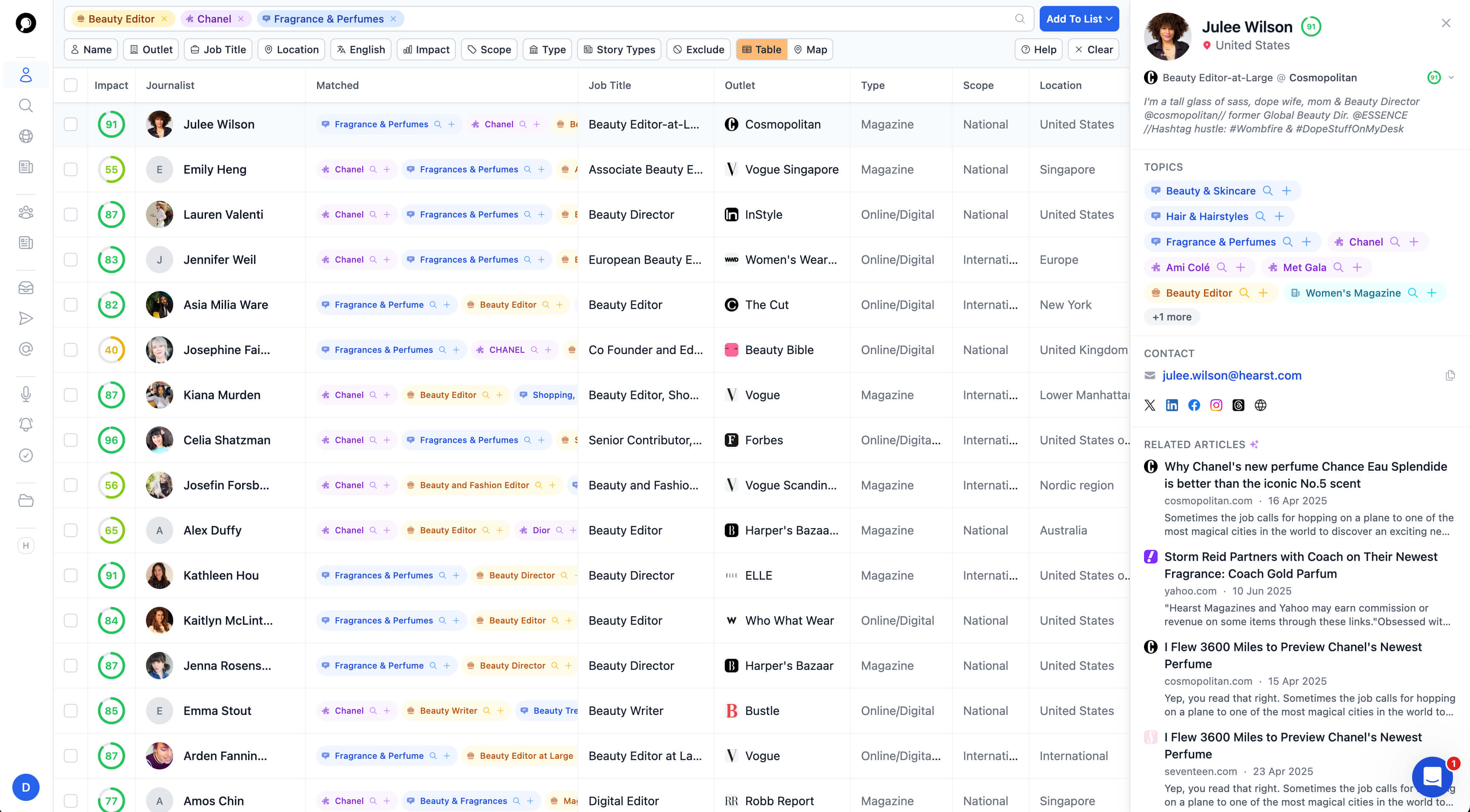
The Search Actually Finds Who You Need
Instead of rigid topic categories, JournoFinder lets you search based on what journalists have actually written about. The article search queries 50 million+ articles, so you find journalists by specific topics - not a category someone assigned years ago.
There’s also live Google News integration for real-time discovery, outlet search with SEO metrics like domain authority and traffic data, and precision map search for finding local and regional journalists worldwide.
I haven’t seen these features at this price point in any other tool.
The Bulk URL Finder Saves Hours of Work
This sealed it for me. Paste in a list of article URLs from Ahrefs, Clicks.so, or any source, and JournoFinder extracts the journalist who wrote each piece and creates a profile. If the journalist isn’t already in the database, it generates one on the fly.
For digital PR and link building, this workflow is transformative. Pull a competitor’s backlink report from Ahrefs, grab the article URLs, paste them into JournoFinder, and you’ve got a verified media list of every journalist who covered a similar story.
What used to take an afternoon now takes minutes.
Support That Actually Responds
Cision users report 2+ week response times [6]. Meltwater’s support has been described as “defensive” [12]. Muck Rack is generally better, but at $5,000+/year you’d hope so.
JournoFinder runs direct human support - no ticketing system or chatbot gauntlet. When I’ve submitted contact update requests, they’ve been actioned within hours. For a tool in this price range, that’s unusual.
What It Costs
$119/month billed annually, or $189/month on a monthly plan. The team plan runs $229/month annually with 3 seats, team collaboration, and a dedicated customer success manager.
There’s a free tier with journalist request alerts (up to 3 daily) and a 7-day free trial of the full platform. No sales call required. You sign up and start searching.
At $119/month annually, that’s $1,428/year - roughly what you’d pay a VA for 100-150 hours of prospecting. Except the database gives you verified access to over a million contacts, continuously updated, with built-in verification, for the entire year.
Where It Falls Short
No tool is perfect.
There’s no built-in email sending or campaign management. You’ll need a separate outreach tool (I use Gmail and a lightweight CRM).
The database is strongest for English-language media. Coverage in non-English markets and outside the US, UK, and Australia is thinner.
Because it’s a newer platform, you won’t find hundreds of reviews on G2 or Capterra yet.
But on the thing that matters most - whether the journalist data is accurate and the emails actually work - it consistently outperforms tools costing 5-10x more.
How JournoFinder Compares to the Enterprise Databases
The question I kept coming back to: does JournoFinder’s data quality hold up against platforms charging $5,000 to $50,000 a year?
Here’s what I found.
| JournoFinder | Muck Rack | Cision | Meltwater | Roxhill | |
|---|---|---|---|---|---|
| Database size | 1,000,000+ | ~300,000 | ~1,400,000 | ~380,000 | ~190,000 |
| Data update method | Real-time article crawling | Curated + AI | Periodic manual updates | Periodic updates | Periodic updates |
| Built-in email verification | Yes (automatic) | No | No | No | No |
| Typical annual cost | ~$1,428 | $5,000-$50,000 | $7,000-$23,000 | $15,000-$100,000 | ~$7,500+ |
| Monthly billing available | Yes | No | No | No | No |
| Free trial | 7 days | No | No | No | On request |
| Sales call required | No | Yes | Yes | Yes | Yes |
| Outlet SEO metrics | Yes (DA, traffic) | No | No | No | No |
| Bulk URL journalist finder | Yes | No | No | No | No |
| Media monitoring included | No | Yes | Yes | Yes | Yes |
| Trustpilot rating | N/A (new) | N/A | 1.7/5 [6] | 1.7/5 [12] | N/A |
| Contract type | Monthly or annual | Annual only | Annual only | Annual only | Annual only |
A few things jump out.
JournoFinder’s database is larger than Muck Rack, Meltwater, and Roxhill. Cision’s 1.4 million is the only larger database on raw numbers, but widespread complaints about data accuracy suggest size doesn’t equal quality.
It’s the only tool with built-in email verification. Every other platform leaves verification to you - additional cost, additional time, additional bounce risk.
The pricing gap is enormous. JournoFinder at $1,428/year delivers comparable or better data than platforms charging 3x to 35x more. Enterprise tools bundle monitoring, social listening, and analytics. But if your primary need is accurate journalist contacts, you’re paying a massive premium for features you may not use.
No enterprise database offers outlet SEO metrics or bulk URL journalist finding. These features are built for digital PR and link building workflows that legacy platforms never considered.
The one legitimate advantage enterprise platforms hold is media monitoring - tracking coverage, alerts, and reporting on media mentions. If that’s core to your workflow, Muck Rack or Meltwater may justify the cost.
But if your primary need is finding journalists and pitching them with confidence that your emails will arrive, JournoFinder delivers that at a fraction of the price.
Frequently Asked Questions
What is the best cheap media database for PR professionals?
Based on my testing, the best affordable media database is JournoFinder, starting at $119/month on an annual plan. It offers over 1,000,000 journalist contacts with built-in email verification and real-time data updates from crawling 50 million+ news articles. Most other tools at this price point suffer from stale data, rigid search categories, and lack of verification, resulting in bounce rates of 25-40% that damage your sender reputation.
How much does a media database cost in 2026?
Media database pricing falls into two distinct tiers. Enterprise platforms like Muck Rack ($5,000-$50,000/year), Cision ($7,000-$23,000/year), Meltwater ($15,000-$100,000/year), and Roxhill (~$7,500/year) require annual contracts and sales calls. At the affordable end, tools with 1,000,000+ contact databases exist from roughly $119/month, putting them under $1,500/year. The data quality gap between tiers has narrowed significantly.
Are cheap media databases accurate enough for professional outreach?
Most are not. The majority of budget databases rely on static contact lists updated infrequently, resulting in bounce rates of 25-40% in my testing. However, tools using real-time article crawling and built-in email verification can match or exceed enterprise accuracy. The key metric is email deliverability: if more than 10-15% of a sourced list bounces, the data isn’t fresh enough for professional use.
Is it better to build media lists manually or pay for a database?
For small campaigns under 50 journalists, manual prospecting using Google News, search operators, and free verification tools is entirely viable. For ongoing outreach across multiple campaigns, the time investment becomes unsustainable. Building and verifying 100 quality contacts takes a full working day, and the list starts going stale immediately. At $119/month for a verified database of 1,000,000+ contacts, the subscription pays for itself the moment you’re running more than one or two campaigns per month.
What features should I look for in an affordable media database?
Three features separate useful affordable databases from money-wasters. First, built-in email verification ensures you’re not destroying your sender reputation with dead addresses. Second, real-time data updates matter far more than raw database size - 500,000 current contacts outperform 2 million stale ones. Third, flexible search that finds journalists by what they’ve recently written about, rather than rigid topic categories.
How do I verify journalist email addresses before pitching?
Run every email through a dedicated verification tool before sending. ZeroBounce offers 100 free verifications per month [7]. Hunter.io provides 50 free verifications monthly [8]. NeverBounce runs from $8 per 1,000 addresses [9]. Some media databases include automatic verification on export, eliminating this step entirely. Never send to an unverified address - even a handful of hard bounces can trigger spam filters for all future outreach.
Can I use a media database for digital PR and link building?
Yes, and affordable tools built for digital PR workflows often outperform enterprise platforms here. Features like outlet-level SEO metrics (domain authority, traffic data) let you prioritise pitches by link value. Bulk URL journalist finders that extract bylines from Ahrefs backlink exports create media lists from competitor coverage in minutes. Enterprise platforms like Cision and Muck Rack were designed for traditional comms and don’t include these capabilities.
How quickly do journalist contacts go stale?
Roughly 25-30% of journalist contacts become outdated within a year. Reporters frequently change beats, switch publications, or leave the industry. Any static media list needs full re-verification every 3-6 months. Databases that continuously crawl published articles handle this decay automatically. Static databases that rely on periodic manual updates fall behind much faster.
Is it worth hiring a VA to build media lists instead of using a database?
A trained virtual assistant can handle manual journalist research for $5-15/hour. For a one-off list of 200-300 targeted contacts, this can be cost-effective. The limitations are time (expect 2-3 days), immediate data decay, quality control overhead, and needing to repeat the process for every new campaign. For ongoing outreach, the economics favour a verified database that stays current automatically.
References
-
https://www.prezly.com/academy/muck-rack-pricing-guide -
https://www.prezly.com/academy/cision-pricing -
https://www.agorapulse.com/blog/social-media-management-tools/meltwater-pricing/ -
https://prowly.com/magazine/roxhill-pricing/ -
https://determ.com/blog/how-to-build-a-media-list-for-pr/ -
https://www.trustpilot.com/review/cision.com -
https://www.zerobounce.net/free-email-verifier -
https://hunter.io/pricing -
https://www.neverbounce.com/ -
https://clearout.io/pricing/ -
https://www.salesforge.ai/blog/cold-email-laws -
https://www.trustpilot.com/review/meltwater.com